Work that moves itself.
EDC-MoveStar® automations move jobs to the next step, assign them to the right person, and send the right update — without anyone remembering to do it.
All move types | All company sizes | All over the world
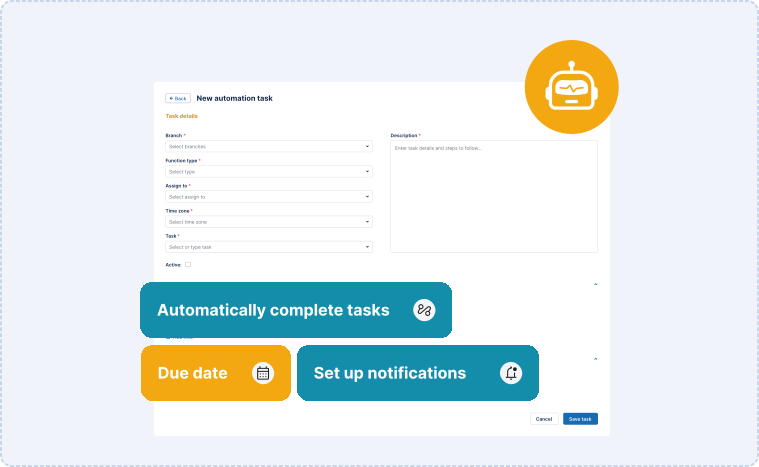
Nothing in your operation should be waiting on someone to remember.
A job sits because nobody noticed it was ready. A shipper calls because nobody sent the update. A task waits because the person who owns it doesn't know it's theirs yet.
Build the rules your operation already follows, and jobs move to the next step, land on the right person's list, and trigger the right update — without anyone pushing them along.
Set it once. It runs every time.
Build the rules you already follow.
Define what should happen when a job hits a milestone. Your process, encoded — not someone else's template.
Work routes itself.
Jobs advance to the next step and land on the right person's list automatically. Nobody hands work off manually.
Partners and shippers stay current.
Status-based updates go out to shippers, agents, and move partners the moment something changes. No status calls, no "any update?" emails.
Nothing falls through.
Reminders and alerts fire on schedule, so tasks with no owner and jobs with no movement surface before they become problems.
Documents route automatically.
Completed paperwork sends to the right person, customer, or military partner based on your workflow.
Works across the whole system.
Automations run on the same records as your CRM, dispatch, warehouse, and billing — so a rule can touch any part of the move.
From rule to running, in four steps.
Define
Pick the trigger: a status change, a date, a completed task.
Build
Set what happens next: advance the job, assign the owner, send the update, etc.
Activate
Turn it on. It applies to every job that meets the condition.
Adjust
Change the rule as your process changes. No developer required.
Automation for moving companies: FAQs
{{ f.a }}
See your process running on its own.
Book a demo and we'll show you how automations move work through the system.
Features